Introduction: The Buzz Around “Headless”
“Headless WordPress” has become one of those phrases developers toss around like a badge of modernity. It sounds cool, futuristic — and sometimes, it really is.
But before you rip the head off your WordPress site and spin up a React frontend, it’s worth asking: why? Because going headless isn’t always a performance upgrade or an SEO dream. Sometimes, it’s a ticket to unnecessary complexity.
Let’s unpack when it’s worth it — and when it’s just not.
What “Headless WordPress” Really Means
In a traditional setup, WordPress does everything — it stores data, renders templates, handles routing, and delivers full pages to the browser.
In a headless setup, WordPress acts purely as a content API.
It provides data (via REST API or GraphQL), while a separate frontend — usually built with frameworks like Next.js, Nuxt, or Gatsby — handles rendering and user experience.
In short:
WordPress becomes the “body,” your frontend becomes the “head.”
⚡ When Headless WordPress Shines
1. You Need a Truly Custom Frontend
If you’re building a highly interactive app-like interface — say, a web portal, SaaS dashboard, or mobile app consuming the same content — headless is a strong choice.
It gives your team total design freedom and decouples your content system from presentation.
Example:
-
WordPress handles blog posts and marketing pages.
-
Next.js app consumes those posts via REST API.
-
React components handle client-side rendering, dynamic transitions, and caching.
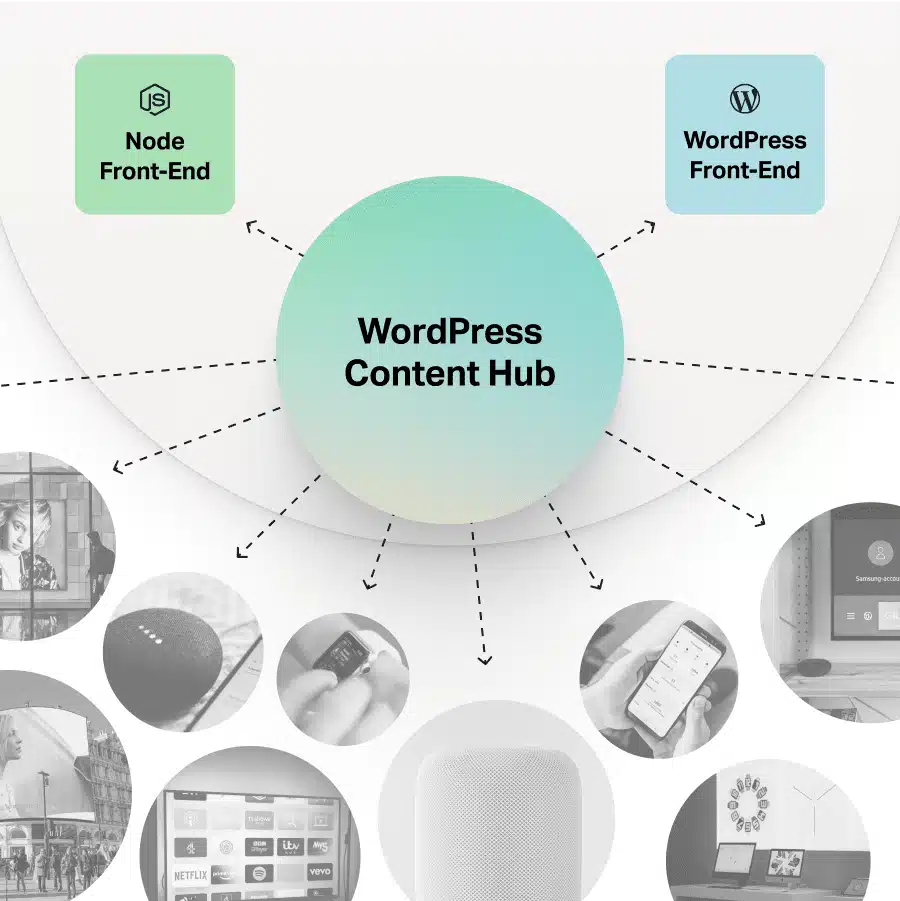
2. You’re Targeting Multiple Platforms
A headless CMS lets you push the same content to:
-
A website
-
A mobile app
-
A kiosk, digital display, or even a smartwatch
When your content lives in one place but serves many endpoints, headless architecture keeps everything consistent and maintainable.
3. You Want Modern Dev Practices
Frontend teams love their stacks — TypeScript, GraphQL, Tailwind, CI/CD, atomic components.
Headless WordPress lets developers use those tools without being boxed in by PHP or the WordPress theme layer. It’s a win for engineering culture and scalability.
4. You Need Performance and Edge Delivery
Static site generation (SSG) or incremental static regeneration (ISR) via tools like Next.js can drastically reduce load times, improve security, and scale better under traffic spikes.
Your frontend can live on Vercel, Netlify, or Cloudflare, with blazing edge delivery, while your WordPress dashboard stays safely behind the scenes.
When Headless WordPress Isn’t Worth It
1. You Just Need a Marketing Site
If your site is a company homepage, blog, or landing page — WordPress already does that beautifully.
Going headless here usually adds:
-
A second hosting environment
-
Build processes
-
API maintenance
-
Preview challenges
All for minimal gain. The traditional stack is faster to build, easier to maintain, and SEO-ready out of the box.
2. You Don’t Have a Dedicated Dev Team
Headless setups require two codebases (frontend + backend), two deployments, and ongoing coordination between them.
If you’re a solo dev, agency, or small business without the bandwidth — you’ll spend more time maintaining infrastructure than shipping features.
3. SEO Is a Priority and You’re Not Using SSR
Client-side rendering can hurt SEO if not handled carefully.
Sure, frameworks like Next.js fix this with server-side rendering, but if your frontend is purely SPA-style — crawlers may struggle, leading to poor indexing.
4. You Rely Heavily on Plugins
Headless breaks the magic of “it just works.”
Many plugins — SEO, forms, page builders, even WooCommerce — expect to run within a normal WordPress theme.
Once headless, those frontend components don’t auto-render anymore; you’ll need to manually rebuild their output using APIs.
⚖️ Pros vs Cons at a Glance
| Aspect | Headless WordPress | Traditional WordPress |
|---|---|---|
| Performance | ⚡ Extremely fast with static generation | ⚙️ Fast, but depends on caching |
| Flexibility | Total control of frontend stack | Limited to WordPress themes |
| Maintenance | Complex (two systems) | ✅ Easier to manage |
| SEO | Great with SSR, tricky with SPAs | Excellent out of the box |
| Plugins | Limited compatibility | Full compatibility |
| Cost | Higher (more infra, dev time) | Lower overall |
Real-World Use Cases
✅ When It’s Worth It
-
News/media portals needing lightning-fast delivery across web & app.
-
Headless commerce setups using WordPress + Shopify API.
-
Custom web apps that mix content + functionality (e.g., learning platforms).
When It’s Overkill
-
Personal portfolios or agency websites.
-
Corporate blogs and simple landing pages.
-
Sites relying on WP plugins for dynamic features (forms, SEO, etc.).
My Take
Headless WordPress isn’t the future — it’s a future.
It shines when used intentionally, for scale, flexibility, or multi-channel delivery. But if all you need is a performant, content-driven site with fast iteration, classic WordPress still wins — every single time.
The best developers aren’t the ones who chase trends — they’re the ones who pick the right tool for the job.